
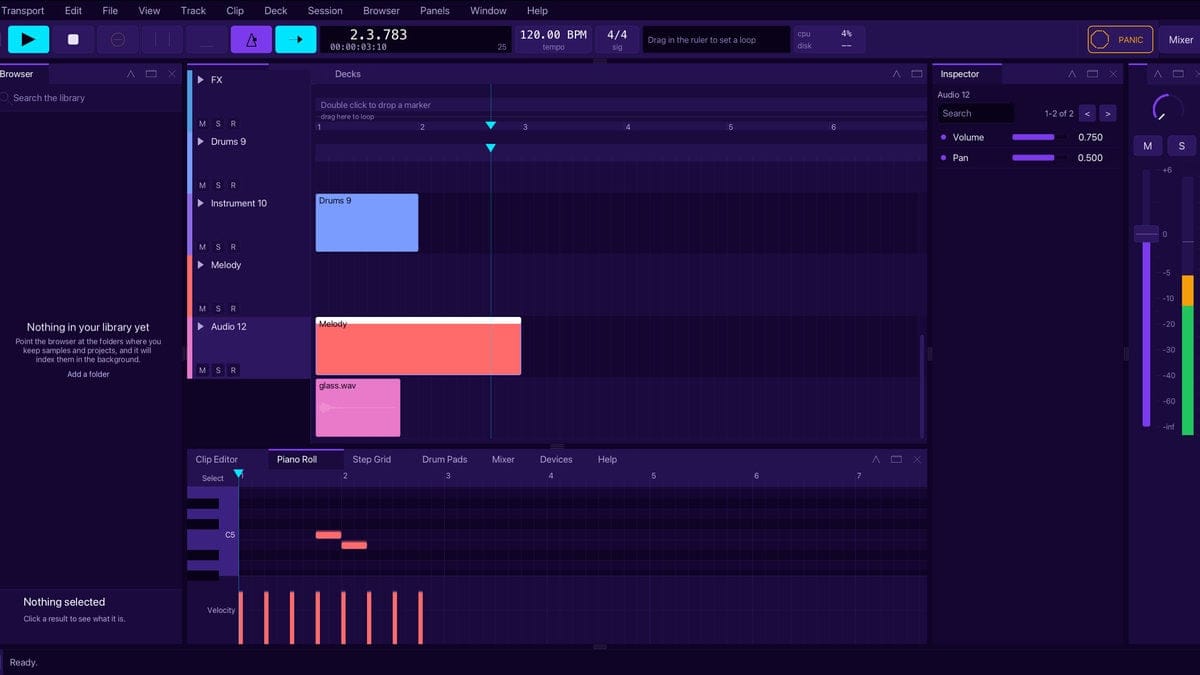
Solstice is a free DAW for Windows and Mac, and from today it’s in public beta. It’s music production software and DJ software in one program: you can program a beat, draw a bassline and chords, arrange a whole track, mix it, export it, and then play it out on two or four decks without leaving the window. It’s made in New Zealand by the team behind Ravers Co, it’s free, and we’re asking everyone who tries it to help us shape what it becomes.
If you’ve been wondering how to start making electronic music, or you’re a DJ who wants to make the tracks you play, this is for you. If you already produce in something else, we’d love you to try it too, and to tell us honestly where it falls short.
What is a DAW, and what does Solstice do?
A DAW, or digital audio workstation, is the program where modern music gets made. It records and plays sounds, lets you write notes for instruments, lines everything up on a timeline, and mixes it all down to a finished file. Most of the electronic music you hear at a festival started life in one.
Solstice does all of that, and adds something most DAWs leave to a separate app: a pair of DJ decks with a mixer between them. The same program that builds your track can play it in a set.
It comes with sounds of its own, so there’s nothing else to buy or install before you hear something. There’s a drum kit with ten synthesised drums, a synthesiser for basslines, chords and leads, and eight effects: an equaliser, a compressor, a gate, a reverb, a delay, a chorus, saturation and a utility. When you want more, it loads VST3 and CLAP effect plug-ins on Windows, and CLAP effect plug-ins on a Mac.
Hear it in a minute
The quickest way to understand Solstice is to open First listen, the demo on the welcome screen, and press the space bar. It’s eight bars at 124 BPM: a four-on-the-floor kick with off-beat hats and claps, a bass on the off-beats, a run of chords through reverb and chorus, and a lead that comes in halfway through a delay. Every sound is made inside Solstice, so you can pull it apart: solo a track, open the mixer, look at the notes in the piano roll. It’s saved into your own projects folder the first time you open it, so it’s yours to change.
The main parts of Solstice
- The arrangement. Your track laid out in time, one lane per track, running left to right. Drag sounds in, trim them, split them, fade them, duplicate a bar into a verse, and mark out the intro, the drop and the breakdown as named sections. Record a MIDI keyboard or several audio inputs at once, and change the tempo or the time signature anywhere in the song.
- The session grid. Every track’s clips in a grid you can launch by hand. A clip you press waits for the next bar before it starts, so whatever you fire stays in time. It’s where loops turn into ideas, and where a live set can happen.
- The step grid. A drum machine. Click squares to switch steps on, add swing, humanise the timing, and give a lane its own length so a seven-step hat drifts against a sixteen-step kick. Load your own samples onto the pads when the built-in kit isn’t enough.
- The piano roll. Where notes are drawn. Pencil in a bassline, stack chords, shape how hard each note is played in the velocity lane, and quantise anything loose back onto the grid.
- The mixer and the device chain. A strip per track with a fader, pan, mute, solo and a meter, send knobs to return tracks, group tracks, an output for every track, and sidechain from any track. Each track’s device chain holds its effects in the order the sound passes through them, and automation lets the level, the pan, the synth’s filter and plug-in controls move on their own as the track plays. Record it by hand in Touch, Latch or Write.
- The decks. Two decks, or four, and a DJ mixer: scrolling waveforms in three-band colour stacked deck over deck, BPM and key on each deck, beat loops, loop roll, slip and beat jump, a pitch fader with key lock, sync, cue points and eight hot cues kept with each track, loops, channel faders, a three-band EQ with kills, a filter, Beat FX timed to the beat (echo, reverb, flanger, phaser and roll), a crossfader (with an A, THRU or B switch on each channel in four-deck mode) and a headphone cue. Scratch with a controller’s jog wheel or the mouse. Bring your Rekordbox or Traktor library across with its playlists, hot cues, loops, beat grids and keys. Plug in a Pioneer DJ DDJ-FLX4 or DDJ-400, a Numark Mixtrack Pro FX or a Hercules DJControl Inpulse 200 or 300 and it works with nothing to map (each layout is built from the maker’s published MIDI messages and hasn’t yet been tried on the hardware), map any other MIDI controller a control at a time, and record your whole set to disk while you play.
- Export. Render your finished track to WAV, AIFF or FLAC, or to a smaller compressed file for sharing, at the bit depth you choose.
Why try Solstice over what you use now?
We’ll be straight with you. Solstice is a new program in beta, and the big names have had decades. Here’s why we think it’s worth your time anyway.
- It’s free. Sign in to a free Ravers Co account and download it. If you’re new to music production software and don’t want to spend money before you know whether you’ll love it, that matters.
- It’s made here. Solstice is written in New Zealand by the team behind Ravers Co. When you tell us something, it reaches the person who writes the code.
- It’s built for producing and performing. Most people end up learning one program to make music and another to play it. Solstice puts the arrangement, the session grid and the decks in one window, a key press apart.
- Your music stays yours. Nothing you make is uploaded anywhere. There’s no AI in Solstice, and nothing you make goes to any AI service. Apart from checking your licence key and asking whether there’s a newer version, Solstice sends nothing by itself, and neither of those includes anything about your music.
- It explains itself. Hover over a control and Solstice tells you what it does. Press F1 for the manual. The command palette (Ctrl+Shift+P, or Command+Shift+P on a Mac) finds any command when you type part of its name.
What it doesn’t do yet
Being honest about this saves you an evening of looking for things that aren’t there:
- On a Mac it loads Audio Units, VST3 and CLAP plug-ins, except Audio Units that only come as an app extension, which aren’t offered yet.
- It can send MIDI clock to a drum machine, but it can’t follow an external clock or join Ableton Link yet.
- There’s no AI built in. If you’d want AI features, or you’d rather we never added them, tell us. If they ever come, they’ll be something you switch on yourself.
How to get Solstice
- Go to the Solstice download page and sign in to your Ravers Co account, or create one. It’s free.
- Download Solstice for Windows, or for Mac (Apple silicon or Intel). Windows has an installer; on a Mac you can use the installer package or the disk image. Solstice isn’t notarised by Apple yet, so the first time you start it on a Mac you may need to go to System Settings, Privacy & Security and click Open Anyway.
- Find your licence key on your account page. The licence is personal and tied to your account, and the music you make with it is yours.
- Start Solstice. The first time, it asks for your key and checks it online once. After that it works offline for 30 days at a time.
- Open First listen on the welcome screen and press the space bar.
There’s an illustrated guide to every part of the program at ravers.co.nz/daw/help.
This is a beta, and it needs you
Here’s the honest reason Solstice is in beta: it can only become a truly great program if the people using it tell us what’s wrong with it. We test it hard, but we can’t sit at your desk with your computer, your audio interface, your plug-ins and the way you like to work. You can. Every report we get makes Solstice better for the next person who downloads it.
Please tell us everything. The small annoyances matter as much as the crashes.
- Something went wrong? Press Ctrl+Alt+Shift+R (Command+Option+Shift+R on a Mac) inside Solstice, or choose Help, Report A Problem, and write a line about what you were doing. You see the whole report before anything is sent, with your name and your folders taken out, and nothing leaves your computer unless you press Send. Your music and your projects are never in it.
- Want something built? The download page has a “Tell us what to build next” form. Ask for the feature you’re missing, however big or small.
- Found a bug? Use the bug report form on the download page, or email us at [email protected].
- Got five minutes? Help, Beta Questionnaire asks five short questions we can’t answer by reading a log, like what you tried to make and whether the audio fought you.
We read every one. What you tell us decides what we build next.
Learn Solstice with us
From Monday 23 November we’re publishing a free twelve-part tutorial series, three a week for four weeks: installing Solstice and hearing your first sound, making your first beat, drawing basslines and chords, working with audio, arranging a track, effects, automation, mixing, jamming live in the session grid, DJing on the decks, exporting your track, and moving over from Ableton, FL Studio, Logic or Rekordbox. You’ll find every part on our Solstice page as it goes up.
Solstice is written by Gareth Erasmus, with Justine Keating on creative and design, and made by Ravers Co (Unicorn Mystic Group Limited, trading as Ravers Co New Zealand). Download it, make something, and tell us what you think. We can’t wait to hear what you make.